A Simple Guide on how to Upload Multiples Files in Knack! - (Object Based)

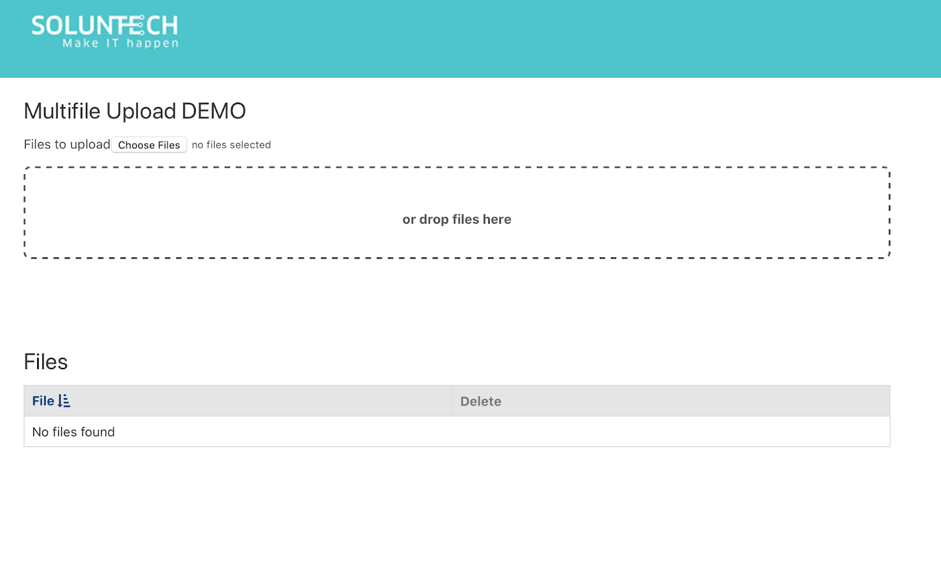
Imagine that you are working on an application for a traveling agency that needs to have several files attached to a single reservation. In this case it can be for one traveler or several ones which will lead to upload information into the database such as travel insurance, passport Id, driver's license, flight and hotel Information among others.
Since it is important to save time and accomplish tasks in a timely manner, we want to share with you this guide on how you can upload multiple files at once and be more efficient in the work you do.
Just follow these simple steps:
1. Create new Object in Builder with at least one field of type File
2. Create a new page with the options selected below

3. Insert the following code in the API & Code section of the APP (Javascript Tab):
var ASYNC_URL =
'https://cdnjs.cloudflare.com/ajax/libs/async/1.5.0/async.min.js';
// Replace your Knack APP info
var headers = {
'X-Knack-Application-ID': 'XXXXXXXXXXX',
'X-Knack-REST-API-Key': 'YYYYYYYYYYYYYYYY'
};
var uploadFile = function (type, filename, blob, success, error) {
//https://api.knackhq.com/v1/applications/app_id/assets/file/upload
success = success || function () {};
error = error || function () {};
type = type || 'image';
// Required
var fd = new FormData();
// Add files
if (filename) {
fd.append('files', blob, filename);
} else {
fd.append('files', blob);
}
// Return a promise
return $.ajax({
type: 'POST',
url:
Knack.api_url +
'/v1/applications/' +
headers['X-Knack-Application-ID'] +
'/assets/' +
type +
'/upload',
headers,
data: fd,
processData: false,
contentType: false,
success,
error
});
};
var createRecord = function (fileId) {
return $.ajax({
// Replace object id
url: Knack.api_url + '/v1/objects/object_XX/records',
type: 'POST',
headers,
data: {
field_XXX: fileId // Replace file field_id
}
});
};
var dataURItoBlob = function (dataURI) {
var byteString;
if (dataURI.split(',')[0].indexOf('base64') >= 0) {
byteString = atob(dataURI.split(',')[1]);
} else {
byteString = unescape(dataURI.split(',')[1]);
}
// separate out the mime component
var mimeString = dataURI.split(',')[0].split(':')[1].split(';')[0];
// write the bytes of the string to a typed array
var ia = new Uint8Array(byteString.length);
for (var i = 0; i < byteString.length; i++) {
ia[i] = byteString.charCodeAt(i);
}
return new Blob([ia], { type: mimeString });
};
// Replace your scene id
$(document).on('knack-page-render.scene_XXX', function (e, view) {
var viewForm = 'view_XXX'; // Replace your form view id
// Replace file field_id
$(
'<div class="kn-input kn-input-file">' +
'<label for="field_XXX" class="knack-input-label"><span class="kn-input-label">Files to upload</span></label>' +
'<input type="file" id="fileselect" name="fileselect[]" multiple="multiple" />' +
'<div id="filedrag">or drop files here</div>' +
'<div id="messages"></div>' +
'</div>'
).insertAfter('#' + viewForm + ' .kn-form-group-1');
var $submitInput = $('#' + viewForm + ' .kn-submit button[type=submit]');
// Prevent submit action
$submitInput.hide();
LazyLoad.js([ASYNC_URL], function () {
if (window.File && window.FileList && window.FileReader) {
initialize();
}
function $id(id) {
return document.getElementById(id);
}
function output(msg) {
var m = $id('messages');
m.innerHTML = msg + m.innerHTML;
}
function initialize() {
window.files = [];
var fileselect = $id('fileselect');
var filedrag = $id('filedrag');
// file select
fileselect.addEventListener('change', FileSelectHandler, false);
// file drop
filedrag.addEventListener('dragover', FileDragHover, false);
filedrag.addEventListener('dragleave', FileDragHover, false);
filedrag.addEventListener('drop', FileSelectHandler, false);
filedrag.style.display = 'block';
// handle submit action
$submitInput.on('click', function (event) {
event.preventDefault();
if (!files.length) {
alert('Error, they have not been selected files');
return;
}
Knack.showSpinner();
async.each(
files,
function (file, next) {
var fileReader = new FileReader();
fileReader.onloadend = function (e) {
var blob = dataURItoBlob(fileReader.result);
uploadFile('file', file.name, blob, function (record) {
createRecord(record.id)
.done(function () {
next();
})
.fail(next);
});
};
fileReader.readAsDataURL(file);
},
function (err) {
if (err) {
alert('Internal error, please consult with your administrator.');
}
alert('All files were created successfully');
// This reloads the page (it is optional)
location.reload();
}
);
});
function FileDragHover(e) {
e.stopPropagation();
e.preventDefault();
e.target.className = e.type == 'dragover' ? 'hover' : '';
}
// file selection
function FileSelectHandler(e) {
// cancel event and hover styling
FileDragHover(e);
// fetch FileList object
var _files = e.target.files || e.dataTransfer.files;
// process all File objects
for (var i = 0, f; (f = _files[i]); i++) {
files.push(f);
showInformation(f, files.length);
}
handleRemoveFileEvents();
// Allow submit
$submitInput.show();
}
function showInformation(file, index) {
output(
'<p>' +
'File information: <strong> ' +
file.name +
'</strong> type: <strong> ' +
file.type +
'</strong> size: <strong> ' +
file.size +
'</strong> bytes' +
' ' +
'<a href="#" class="removeFile" data-index="' +
index +
'">remove</a>' +
'</p>'
);
}
function refreshInformation() {
var m = $id('messages');
m.innerHTML = '';
for (var i = 0, f; (f = files[i]); i++) {
showInformation(f, i + 1);
}
handleRemoveFileEvents();
}
function handleRemoveFileEvents() {
$('.removeFile').on('click', function (e) {
e.preventDefault();
var $target = $(e.target);
var index = $target.attr('data-index');
files.splice(index - 1, 1);
// Clear all
$('.removeFile').off();
// Capture again
refreshInformation();
});
}
}
});
});
4. Insert the following code in the API & Code section of the APP (CSS Tab):
/* Replace your form view id */
#view_XXX form .kn-form-group-1 {
  display: none;
}
#filedrag
{
  min-height: 100px;
  display: none;
  font-weight: bold;
  text-align: center;
  padding: 1em 0;
  margin: 1em 0;
  color: #555;
  border: 2px dashed #555;
  border-radius: 7px;
  cursor: default;
  height: 50px;
  padding-top: 45px;
}
#filedrag.hover
{
  color: #f00;
  border-color: #f00;
  border-style: solid;
  box-shadow: inset 0 3px 4px #888;
}
#messages {
  margin-top: 15px;
}
#messages p {
  margin-bottom: 2px !important;
}
5. Implementation demo:
Enter this site and watch how it works: https://soluntech.knack.com/test#multifile-upload/
If you found this helpful, please share it with your colleagues!
Let's Make IT Happen!
Soluntech Team
AI-Native Engineering Firm
Soluntech's team writes about software, AI systems, validation, and operational technology from the perspective of disciplined engineering and long-term system ownership.
Continue with related insights.
Explore more thinking connected to this topic, from software decisions to AI systems and operational execution.
The Hidden Cost of Early Automation: Avoiding Rigid AI
The Hidden Cost of Early Automation: Avoiding Rigid AI
Soluntech Team
AI-Native Engineering Firm

Minimum Viable Intelligence (MVI): Beyond the Traditional MVP
Minimum Viable Intelligence (MVI): Beyond the Traditional MVP
Soluntech Team
AI-Native Engineering Firm

The AI Learning Phase: Moving from Projects to Evolution
The AI Learning Phase: Moving from Projects to Evolution
Soluntech Team
AI-Native Engineering Firm